When Tailscale breaks your LAN host's gateway
This is the follow-on to moving subnet routing onto pfSense. Remote access worked. Tailscale looked fine. But one box on the LAN could not be reached by its real IP, and it could not ping its own gateway. The tailnet still reached it. The wire did not.
If that split sounds familiar, check routing before you blame DNS or firewall rules.
The picture
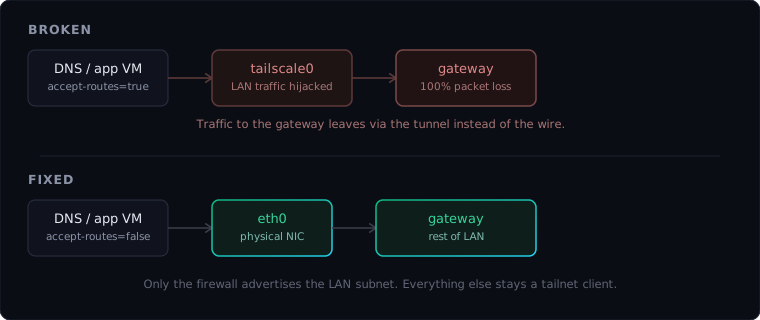
What broke
I ran a preflight check before a DNS cutover. One blocker: a fallback DNS host was completely unreachable from the LAN. Not flaky. Total loss on ping, TCP, and DNS to its static IP.
Console access told a different story. The OS was up. The interface had the right address. Link state was UP. Tailscale on the box was fine. I could reach it from my laptop over the tailnet. But from the LAN itself, nothing could talk to it. Not the firewall. Not neighbors on the same switch. The host could not ping its own gateway in either direction.
Alive on Tailscale. Invisible on the wire it was physically plugged into.
The trap
This host had been the lab’s Tailscale subnet router. It advertised the LAN range it lived on (say 192.168.1.0/24) and had route accepting turned on (RouteAll: true / --accept-routes=true).
Then I moved subnet routing to the firewall, which started advertising the same prefix. Tailscale pushed that route to every tailnet member that accepts routes, including this host, even though the host was on that LAN.
The kernel installed a policy route: traffic destined for the local subnet, including packets to the default gateway, went out the Tailscale interface instead of the physical NIC. Tailscale knows how to reach other tailnet peers. It does not know how to deliver traffic to the gateway on the Ethernet port the host is bolted to. Packets left. Nothing came back. No loud error. Just 100% loss.
The fix
On the affected host, stop advertising routes it should not own and stop accepting subnet routes for the LAN it sits on:
sudo tailscale set --advertise-routes=
sudo tailscale set --accept-routes=false
Check the route table before and after. The self-referential Tailscale route for your own LAN should disappear. Gateway ping should go from 100% loss to 0%. DNS, HTTP, and SSH from other LAN hosts should come back immediately.
In the Tailscale admin console, review Route settings per device and confirm only the intended subnet router advertises the prefix.
The rule
Any device physically on a LAN should not accept Tailscale subnet routes for that same LAN, no matter which machine is advertising them.
Subnet routers belong on stable infrastructure at the edge (in my case, pfSense). Ordinary LAN members (DNS boxes, monitoring VMs, dev machines) should be tailnet clients only: connected, not routing, not accepting routes for their own wire.
This shows up often when you migrate subnet routing from a Pi-hole VM or NUC to a firewall. The old router still accepts routes. Everything looks fine on Tailscale until something on the LAN tries to reach the box by its real IP.
How to diagnose it
When a host is reachable over Tailscale but not from the LAN:
- From the host:
ping 192.168.1.1(or your gateway IP). If this fails locally, suspect routing before firewall rules. - On the host:
ip routeornetstat -rn. Look for your LAN prefix viatailscale0. - On the host:
tailscale statusand check whether accept-routes is enabled. - In the admin console: see who advertises the LAN prefix and whether this device is accepting it.
If step 2 shows the LAN via Tailscale, you are in this trap.
What I do now
- One subnet router. Firewall advertises the LAN; everything else does not.
- No accept-routes on LAN residents. DNS, monitoring, and app VMs stay clients only.
- Preflight before cutovers. Read-only checks against the LAN caught this before a DNS migration wrote bad state. See the Netgate DNS Cutover Toolkit for the full preflight story.
Related
- Making pfSense the front door over Tailscale: moving subnet routing to the firewall
- Netgate DNS Cutover Toolkit: preflight gate, API bug, live DHCP cutover
- pfSense REST API v2: automation on the firewall after routing was fixed